I Got An Unrecognized Charge On My Trustname Account
If you notice an unrecognized charge on your Trustname account, it is often due to an automatic renewal of one of your services. This guide explains how to identify the charge, review your account activity, and secure your account if you suspect unauthorized access.
Key Takeaways
- Check Auto Renewal – Most unexpected charges are automatic renewals.
- Verify Account – Confirm whether you have a Trustname account and review your receipts.
- Review Billing – Check your transaction history for charge details.
- Secure Account – Reset your password if you suspect unauthorized access.
- Contact Support – Reach out to Trustname if you cannot identify the charge.
TABLE OF CONTENTS
If you got an unrecognized charge on your account, most times, you have auto renewal turned on and we charged to renew one of your expiring services. In rare cases, someone may have access to your account and used your payment details to pay for a service.
Follow these steps to troubleshoot unrecognized charges.
- If You Don't Have A Trustname Account
If you don't have an account with us and received a charge from Trustname.com that you didn't initiate in your bank statement or debit notifications, then someone else used your card to pay for a product on Trustname.
Confirm with any of your friends or family who have access to your payment details to be sure who initiated the charge.
If you can't find out who initiated the charge, contact our support and give us details of the payment the payment date, the amount, and the details of the card used to make the payment.
Confirming If You Have A Trustname Account
If you're not sure whether you have a Trustname account, kindly check all your email addresses. Whenever we receive payment for a product, Trustname will send a receipt to the associated email address.
In your email app, search for 'Trustname' and 'Trusted Domain Registrar' to find any emails we may have sent. Also check your spam/junk folder for any emails you may have missed. If you are getting emails from us, then it means you have an account and we likely charged for one of your products.
- You Have An Active Trustname Account
If you have a Trustname account and received an email from us, you can confirm the details of your recent charge directly in your dashboard.
To check your transaction history on Trustname, follow these steps.
- Log In to Your Account
Head to the Trustname.com website and click the "Log In" button at the top right. Enter your login details username and password and if you have two-factor authentication (2FA) enabled, copy the auth code from the authenticator app you used to set it up (e.g. Google Authenticator).
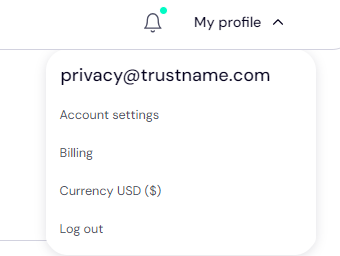
- Head To Your Billing SettingsClick on the "My profile" button at the top right of the page and select "Billing".
 From this page, you'll be able to see all your payment methods, wallet balance, and your transaction history.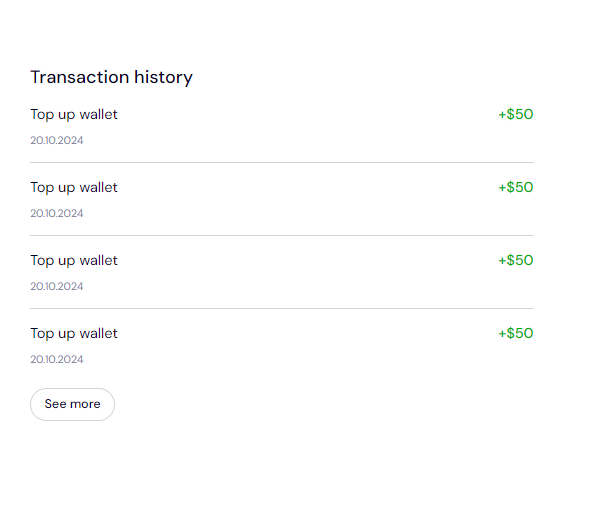
Review the inputs to see the charge you didn't recognize.
The transaction history will also come in handy if you believe you were charged more than once for the same order you placed. Note that the amounts you see may be slightly different due to currency conversion charges.
- Review The Order
If you find the order and are sure you didn't place it, you can click on the "See more" button to see the date, the amount charged, and the transaction description.
If the order was made for one of your existing products on Trustname, it is likely an auto renewal to ensure your service stays active and is nothing to worry about.
On the other hand, if you still don't recognize the product, then someone else may have access to your account. If you have a developer or marketing professional in charge of your website, then you should confirm with them first if they placed the order.
- Log In to Your Account
Securing Your Account
Some Telltale Signs That Your Account May Be Compromised
If you are suspecting that your account is compromised.
These Are Some Signs To Look Out For:
- Receiving unrecognized orders.
- You receive password reset emails you didn't request.
- You receive an email confirming that you want to disable two-factor authentication (2FA) that you didn't request or any other 2FA notifications you didn't initiate.
- You are receiving EPP/Auth codes you didn't request.
- You can't log in to your account with your credentials.
If you believe that your account has been compromised and no one you know had anything to do with the order, you should secure your account by resetting your password immediately, check the contact details associated with your account and domains, and contact us right away.